
TS-7553-V2 Manual Test A
TestA - 12-18-25 LT This is a NEW draft re-write of the original Manual that will become TS-7553-V2 Manual only. For now it is an experimental copy only that will evolve or get replaced.
| WARNING: | This is not the current latest manual for the TS-7553-V2, this is a page for testing new manual layouts. Please return to the TS-7553-V2 manual for the latest up to date manual! |
 | |
| Product Page | |
| Documentation | |
|---|---|
| Schematic | |
| Mechanical Drawing | |
| FTP Path | |
| Processor | |
| NXP i.MX6UL | |
| 528MHz or 696MHz Arm® Cortex®-A7 | |
| i.MX6UL Product Page |
Overview
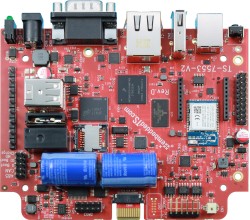
The TS-7553-V2 is a small embedded platform with an NXP i.MX6UL 696 MHz CPU with 512 MB DDR3 RAM. It is a spiritual successor to our TS-7553, using the same form factor and base features, but providing a more powerful CPU and many new features for overall better performance. The TS-7553-V2 can be ordered with soldered down WiFi with built in Bluetooth, our TS-SILO supercapacitor technology for safe shutdown upon power loss, non-volatile FRAM for 2 KiB of storage. There is also support for USB Gadget via the front USB B socket, an internal USB host port, support for our monochrome LCD and 4 button membrane keypad, and eMMC flash for a vast improvement over the TS-7553's NAND.
Board Assembly
ANNOTATED IMAGE WITH CONNECTORS
To be added: comprehensive run down of HW components and links to their sections in the document.
Features
Battery Backed RTC
The TS-7553-V2 implements a M41T00S STMicro Battery Backed RTC using an external and replaceable coin cell battery. This RTC is connected to the CPU via I2C and is handled by the kernel and is presented as a standard RTC device in linux.
Bluetooth
The Wi-Fi option for this platform also includes a Bluetooth 5.0 LE module. Support for Bluetooth is provided by the BlueZ project. BlueZ has support for many different profiles for HID, A2DP, and many more. Refer to the BlueZ documentation for more information. Please see our BLE Examples page for information on installing the latest BlueZ release, getting started, and using demo applications.
Both Wi-Fi and Bluetooth can be active at the same time on this platform. Note however, that either the Wi-Fi interface needs to be not brought up if Wi-Fi is unused, or it needs to actively connect to an access point or act as an access point. The Bluetooth module can be activated with the following commands:
For Bluez versions found on Debian Stretch and below:
# Enable Bluetooth, and load the firmware
echo BT_POWER_UP > /dev/wilc_bt
sleep 1
echo BT_DOWNLOAD_FW > /dev/wilc_bt
sleep 1

# Attach the BLE device to the system, increase the baud, and enable flow control
hciattach /dev/ttymxc2 any 115200 noflow
sleep 1
hcitool cmd 0x3F 0x0053 00 10 0E 00 01
stty -F /dev/ttymxc2 921600 crtscts

# Note that no other HCI commands should be used! In older versions of BlueZ, HCI commands exist alongside bluetoothd, however HCI commands can interfere with the bluetoothd stack.
For newer versions of BlueZ found on Debian Buster or newer, or newer versions of BlueZ built from source:
echo BT_POWER_UP > /dev/wilc_bt
sleep 1
echo BT_DOWNLOAD_FW > /dev/wilc_bt
sleep 1

btattach -N -B /dev/ttymxc2 -S 115200 &
sleep 1
bluetoothctl power on
sleep 1
hcitool cmd 0x3F 0x0053 00 10 0E 00 01
kill %1 # This terminates the above btattach command
sleep 1
btattach -B /dev/ttymxc2 -S 921600 &
At this point, the device is running at 921600 baud with flow control, and is fully set up ready to be controlled by various components of BlueZ tools. For example, to do a scan of nearby devices:
bluetoothctl
power on
scan on
This will return a list of devices such as:
root@ts-imx6ul:~# bluetoothctl
Agent registered
[CHG] Controller F8:F0:05:XX:XX:XX Pairable: yes
[bluetooth]# power on
Changing power on succeeded
[CHG] Controller F8:F0:05:XX:XX:XX Powered: yes
[bluetooth]# scan on
Discovery started
[CHG] Controller F8:F0:05:XX:XX:XX Discovering: yes
[NEW] Device 51:DD:C0:XX:XX:XX Device_Name
[NEW] Device 2A:20:E2:XX:XX:XX Device_Name
[CHG] Device 51:DD:C0:XX:XX:XX RSSI: -93
[CHG] Device 51:DD:C0:XX:XX:XX RSSI: -82
[NEW] Device E2:08:B5:XX:XX:XX Device_Name
[CHG] Device 51:DD:C0:XX:XX:XX RSSI: -93
[CHG] Device 2A:20:E2:XX:XX:XX RSSI: -94
[NEW] Device 68:62:92:XX:XX:XX Device_Name
[NEW] Device 68:79:12:XX:XX:XX Device_Name
[bluetooth]# quit
Please note that the Bluetooth module requires the modem control lines CTS and RTS as flow control when running at higher baud rates. It is possible to run the module at the initial 115200 baud if the flow control lines are unwanted.
The module supports some other commands as well:
# Allow the BT chip to enter sleep mode
echo BT_FW_CHIP_ALLOW_SLEEP > /dev/wilc_bt

# Power down the BT radio when not in use
echo BT_POWER_DOWN > /dev/wilc_bt
CAN
| Note: | The TS-7553-V2 Rev. B PCB does not have software control of the CAN_EN# pin for the transceivers and they are always enabled. This is addressed in later hardware revisions. |
The i.MX6UL CPU has two FlexCAN ports that use the linux SocketCAN implementation. The ports can be set up and used with the following commands:
ip link set can0 up type can bitrate 1000000
ip link set can1 up type can bitrate 1000000
The CAN transceivers are automatically controlled by the kernel. If either of the interfaces are brought up in linux then both transceivers will be enabled together. When both interfaces are brought down, then the transceivers will be disabled. By default when the kernel boots, the interfaces are down, and therefore the transceivers are disabled.
At this point the ports can be used with standard SocketCAN libraries.</source>
The following example sends the same packet and parses the same response in C:
#include <stdio.h>
#include <pthread.h>
#include <net/if.h>
#include <string.h>
#include <unistd.h>
#include <net/if.h>
#include <sys/ioctl.h>
#include <assert.h>
#include <linux/can.h>
#include <linux/can/raw.h>

int main(void)
{
	int s;
	int nbytes;
	struct sockaddr_can addr;
	struct can_frame frame;
	struct ifreq ifr;
	struct iovec iov;
	struct msghdr msg;
	char ctrlmsg[CMSG_SPACE(sizeof(struct timeval)) + CMSG_SPACE(sizeof(__u32))];
	char *ifname = "can0";

	if((s = socket(PF_CAN, SOCK_RAW, CAN_RAW)) < 0) {
		perror("Error while opening socket");
		return -1;
	}

	strcpy(ifr.ifr_name, ifname);
	ioctl(s, SIOCGIFINDEX, &ifr);
	addr.can_family  = AF_CAN;
	addr.can_ifindex = ifr.ifr_ifindex;

	if(bind(s, (struct sockaddr *)&addr, sizeof(addr)) < 0) {
		perror("socket");
		return -2;
	}

 	/* For the ozen myOByDic 1610 this requests the RPM gauge */
	frame.can_id  = 0x7df;
	frame.can_dlc = 3;
	frame.data[0] = 3;
	frame.data[1] = 1;
	frame.data[2] = 0x0c;

	nbytes = write(s, &frame, sizeof(struct can_frame));
	if(nbytes < 0) {
		perror("write");
		return -3;
	}

	iov.iov_base = &frame;
	msg.msg_name = &addr;
	msg.msg_iov = &iov;
	msg.msg_iovlen = 1;
	msg.msg_control = &ctrlmsg;
	iov.iov_len = sizeof(frame);
	msg.msg_namelen = sizeof(struct sockaddr_can);
	msg.msg_controllen = sizeof(ctrlmsg);
	msg.msg_flags = 0;

	do {
		nbytes = recvmsg(s, &msg, 0);
		if (nbytes < 0) {
			perror("read");
			return -4;
		}

		if (nbytes < (int)sizeof(struct can_frame)) {
			fprintf(stderr, "read: incomplete CAN frame\n");
		}
	} while(nbytes == 0);

	if(frame.data[0] == 0x4)
		printf("RPM at %d of 255\n", frame.data[3]);

	return 0;
}
See the Kernel's CAN documentation here. Other languages have bindings to access CAN such as Python, Java using JNI.
In production use of CAN we also recommend setting a restart-ms for each active CAN port.
ip link set can0 type can restart-ms 100
This allows the CAN bus to automatically recover in the event of a bus-off condition.
CPU
This device uses the i.MX6UL CPU, running at up to 696 MHz, based upon a Cortex-A7 core and targeting low power consumption.
Refer to NXP's documentation for more detailed information on the i.MX6UL.
DIO
The TS-7553-V2 offers DIO and a single Relay. The DIO exposed to various headers and terminals are controlled via the CPU. All DIOs are controlled via the kernel sysfs interface. See the kernel's documentation for more detail. All DIO are 3.3 V tolerant unless otherwise noted. All DIO pins have a pullup resistor to 3.3 V.
To interact with DIO pins through the sysfs interface, it first must be exported to userspace, for example, DIO 136 is the En. Relay pin:
echo "136" > /sys/class/gpio/export
If you receive a permission denied on a pin, that means it is claimed by another kernel driver. If the command is successful, there will be a /sys/class/gpio/gpio136/ directory. The relevant files in this directory are:
 direction - "out" or "in"
 value - write "1" or "0", or read "1" or "0" if direction is in
 edge - write with "rising", "falling", or "none"
# Set GPIO 136 high
echo "out" > /sys/class/gpio/gpio136/direction
echo "1" > /sys/class/gpio/gpio136/value
# Set GPIO 136 low
echo "0" > /sys/class/gpio/gpio136/value

# Read the value of GPIO 82, the Push Switch
echo "82" > /sys/class/gpio/export
echo "in" > /sys/class/gpio/gpio82/direction
cat /sys/class/gpio/gpio82/value
| DIO (sysfs) | Chip | Line | Function | Location |
|---|---|---|---|---|
| 18 | 0 | 18 | UART5 CTS | CN9_8 |
| 19 | 0 | 19 | UART5 RTS | CN9_7 |
| 23 | 0 | 23 | RS-232 Shutdown# | N/A |
| 40 | 1 | 8 | XBee DTR | CN5_9 |
| 41 | 1 | 9 | XBee RTS | CN5_16 |
| 46 | 1 | 14 | XBee CTS | CN5_12 |
| 66 | 2 | 2 | NimbeLink V180 | CN5_13 |
| 67 | 2 | 3 | NimbeLink PWR_ON# | CN5_20 |
| 75 | 2 | 11 | NO Charge Jumper# | NO Charge Jumper |
| 81 | 2 | 17 | SD Boot Jumper# | SD Boot Jumper |
| 82 | 2 | 18 | Push Switch# | Push Switch |
| 83 | 2 | 19 | U-Boot Jumper# | U-Boot Jumper |
| 84 | 2 | 20 | XBee Reset# | CN5_5 |
| 117 [1] | 3 | 21 | Keypad 0 | HD4_2 |
| 118 [1] | 3 | 22 | Keypad 1 | HD4_3 |
| 119 [1] | 3 | 23 | Keypad 2 | HD4_4 |
| 120 [1] | 3 | 24 | Keypad 3 | HD4_5 |
| 121 | 3 | 25 | En. LCD Backlight | N/A |
| 128 | 4 | 0 | Power Fail | N/A |
| 135 | 4 | 7 | En. XBee USB# | N/A |
| 136 | 4 | 8 | En. Relay | N/A |
As an output, the value file can be written to 0 for low (GND), or 1 for high (3.3V). As an input the GPIO pins have internal pullups. It is also possible to use any processor GPIO as an interrupt by writing the edge file, and then using select() or poll() on the value file for changes. Note that when the DIO is set as an output, the value file will always read back 0, regardless of actual output state.
Special DIO
The linux GPIO subsystem has a few shortcomings, specifically, an inability to set default output state from the kernel devicetree. Because of this, a number of DIO are implemented as LEDs in the kernel; pins that control various power supplies. While there is also a regulator subsystem that these could be used with, the regulator controls have their own issues as well. The LED subsystem is a very straightforward way to control IO pins in a similar manner to linux GPIO via the sysfs interface.
To enable a particular output, write a 1 to the brightness file for one of these special DIO. For example, to enable 4 V on the CN5 XBee Socket header:
echo 1 > /sys/class/leds/en-modem-5v/brightness
To disable any of the outputs, write a 0 to the brightness file. For example, to disable power to the USB host port:
echo 0 > /sys/class/leds/en-usb-5v/brightness
| DIO | Function | Location |
|---|---|---|
| en-usb-5v | Enable 5 V to USB host | Internal and external USB host |
| en-modem-5v[1] | Enable 4 V to CN5 XBee Socket | CN5_1[2] |
| en-xbee-3v3[1] | Enable 3.3 V to CN5 XBee Socket | CN5_1[2] |
| en-emmc | Enable power to the eMMC device | N/A |
- ↑ 1.0 1.1 Only one of these can be enabled at any time. If en-xbee-3v3 is enabled, en-modem-5v will be disabled in hardware to prevent damage.
- ↑ 2.0 2.1 CN5_6, VBUS, will also be affected by this enable. See the XBee Socket section for more information.
eMMC Interface
The i.MX6UL SD card controller supports the MMC specification, the TS-7553-V2 includes a soldered down eMMC IC to provide on-board flash media.
Our default software image contains 3 partitions:
| Device | Contents |
|---|---|
| /dev/mmcblk1 | eMMC block device |
| /dev/mmcblk1boot0 | eMMC boot partition |
| /dev/mmcblk1boot1 | eMMC boot partition |
| /dev/mmcblk1p1 | Full Debian linux partition |
This platform includes an eMMC device, a soldered down MMC flash device. Our off the shelf builds are 4 GB, but up to 64 GB are available for customized builds. The eMMC flash appears to Linux as an SD card at /dev/mmcblk1. Our default programming of the eMMC is the same as the SD card image for standard partitions, but includes additional boot partitions that are used by U-Boot and are not affected by the eMMC partition table.
The eMMC module has a similar concern by default to SD cards in that they should not be powered down during a write/erase cycle. However, this eMMC module includes support for setting a fuse for a "Write Reliability" mode, and a "psuedo SLC (pSLC)" mode. With both of these enabled all writes will be atomic to 512 B and each NAND cell will be treated as a single layer rather than a multi-layer cell. If a sector is being written during a power loss, a block is guaranteed to have either the old or new data. Even in cases where the wrong data is present on the next boot, fsck is often able to deal with the older data being present in a 512 B block. The downsides to setting these modes are that it will reduce the overall write speed and halve the available space on the eMMC to roughly 1.759 GB. Please note that even with these settings, Technologic Systems strongly recommends designing the end application to eliminate any situations where a power-loss event can occur while any disk is mounted as read/write. The TS-SILO option for the TS-7553-V2 can help to eliminate the dangerous situation.
The "mmc-utils" package is used to enable these modes. The command is pre-installed on the latest image. Additionally we have created a script to safely enable the write reliability and pSLC modes. Since the U-Boot binary and environment reside on the eMMC, care must be taken to save the current state of the boot partitions, enable the modes, restore the boot partitions, and re-enable proper booting options. This script can be used in combination with the production mechanism scripting to complete these steps as part of an end application production process.
| WARNING: | Enabling these modes causes all data on the disk to become invalid and must be rewritten. Do not attempt to run the 'mmc' commands from the script individually, all steps in the script must occur as they are or the unit may be unable to boot. If there are any failures of the script, care must be taken to resolve any issues while the unit is still booted or it may fail to boot in the future. |
| WARNING: | The script is only compatible with Rev. D or newer PCBs. Running the script on any previous PCB revision WILL result in the unit being unable to boot! There is no safe way to enable these modes on previous PCB revisions. |
| Note: | Enabling these modes is a one-way operation, it is not possible to undo them once they are made. Because of this, setting these eMMC modes will invalidate Technologic Systems' return/replacement warranty on the unit. See the warranty section for more information on this. |
The 'emmc_reliability' script can be found in the TS-7553-V2 utilities github repository.
The script must be run when boot from any media other than eMMC, such as SD, NFS, or USB. No partition of the eMMC disk can be mounted when these commands are run. Doing so may result in corruption or inability for the unit to boot. Once the pSLC mode is enabled, all data on the disk will become invalid. This means the partition table will need to be re-created, the filesystems formatted, and all filesystem contents re-written to disk. This is why we recommend using this script in conjunction with the production mechanism scripting. The 'emmc_reliability' script can be run first, then the rest of the production script can create and format the partitions as well as write data to disk.
The script requires a single argument, the device node of the eMMC disk, and will output verbosely to stderr. Any specific errors will also be printed out on stderr.
Example usage:
./emmc_reliability /dev/mmcblk1
Upon successful run, the script will return 0. Any errors will return a positive code. See the script for detailed error code information.
Ethernet Port
The NXP processor implements a 10/100 ethernet controller with support built into the Linux kernel. Standard Linux utilities such as ifconfig/ip can be used to control this interface. See the Configuring the Network section for more details. For the specifics of this interface see the CPU manual.
FEC PTP Support
The i.MX6UL CPU Ethernet supports 1588 PTP (PTPv1 & PTPv2). Note that Linux kernel version 4.9 or greater is required for PTP support with the i.MX6UL CPU.
FRAM
This platform supports a soldered-down, non-volatile Ferroelectric RAM (FRAM) device. The Cypress FM25L16B is a 2 KiB FRAM device in a configuration not unlike an SPI EEPROM. The nature of FRAM means it is non-volatile, incredibly fast to write, and is specified with 100 trillion read/write cycles (per each of the 256 sequential 8 byte rows) with a 150 year data retention at temperatures below 65 °C. The device is connected to Linux and presents itself as a flat file that can be read and written like any standard Linux file.
I2C
The i.MX6UL supports standard I2C at 100khz, or using fast mode for 400khz operation. The CPU has three (3) I2C buses used on the TS-7553-V2.
I2C 1 is a bus for the RTC and the supervisory microcontroller. This bus is used with CPU GPIO pins rather than an internal SPI peripheral, this appears to linux as "/dev/i2c-0"
| Address | Device |
|---|---|
| 0x2a | Supervisory microcontroller |
| 0x68 | Battery backed RTC |
The I2C 2 bus is connected to the Daughter Card header on HD1 and is meant as a general use device. This can be connected to any of our supported daughter cards or any customer designed daughter cards that may need I2C. There are no other connections on this I2C bus, so the entire address range is available for use. The I2C bus is implemented with the CPU I2C peripheral, this appears to linux as "/dev/i2c-2"
The I2C 3 bus is connected internally to the optional IMU (gyroscope/accelerometer/magnetometer). This bus is set up with CPU GPIO pins rather than an internal SPI peripheral, it appears to linux as "/dev/i2c-3"
| Address | Device |
|---|---|
| 0x68 | MPU-9250 IMU |
It is also possible to connect additional I2C busses via GPIO pins if further interfaces are needed. See an example here.
The kernel makes the I2C available at /dev/i2c-# as noted above. Linux i2c-tools (i2cdetect, i2cget, i2cset) can be used to interface with devices, or custom clients can be written.
IMU
Accelerator/Gyro (MPU-9150)
| Note: | Images dated December 15th, 2017 and older need a userspace helper tool, bb_mpu9150, in order to access the IMU data. See this page for instructions on how to obtain and build this tool if needed.
|
On PCB revision D and below, this platform can support an MPU-9250 Inertial Measurement Unit (IMU) device. This provides a Microelectromechanical Systems (MEMS) gyroscope, accelerometer, and magnetometer.
The gyroscope can be configured for ±250/±500/±1000/±2000 degrees per second (dps). The accelerometer can be configured for ±2/±4/±8/±16 standard gravity (g). And the magnetometer has a range of ±4800 microteslas (μT). A temperature sensor is also included in the device as well.
The IMU is supported by the kernel and configuration of the device as well as readings can be taken directly from the sysfs IIO interface.
The magnetometer is a separate silicon die inside of the single package device, it needs to be manually instantiated on each boot as the driver is normally not aware of it. This can be done with the command:
echo ak8975 0x0c > /sys/bus/i2c/devices/i2c-4/new_device
At this point, the gyroscope and accelerometer will appear under files in /sys/bus/iio/devices/iio:device0/ while the magnetometer files are populated in /sys/bus/iio/devices/iio:device1/.
Reading the Accelerometer
The raw value for each accelerometer axis can be read by directly reading the associated file. These can be multiplied by the contents of the file in_accel_scale in order to get the acceleration value in m/s².
# TS-7553-V2 sitting flat on a desk
root@ts-imx6ul:~# cat /sys/bus/iio/devices/iio\:device0/in_accel_scale
0.000598
root@ts-imx6ul:~# cat /sys/bus/iio/devices/iio\:device0/in_accel_x_raw
336  # (0.000598*336) == 0.2 m/s²
root@ts-imx6ul:~# cat /sys/bus/iio/devices/iio\:device0/in_accel_y_raw
140 # (0.000598*140) == 0.08 m/s²
root@ts-imx6ul:~# cat /sys/bus/iio/devices/iio\:device0/in_accel_z_raw
16080 # (0.000598*16080) == 9.6 m/s²
As the angular errors of the floor, desk, and pin protrusion on the bottom of the TS-7553-V2 add up, it can be observed that the accelerometer is not perfectly flat and is instead at a slight angle.
Reading the Gyroscope
Similar to the accelerometer above, raw information can be read from the gyroscope about the current rotation. These values can be multiplied by the scale in order to get the current movement in degrees per second.
# TS-7553-V2 sitting flat on a desk
root@ts-imx6ul:~# cat /sys/bus/iio/devices/iio\:device0/in_anglvel_scale
0.001064724
root@ts-imx6ul:~# cat /sys/bus/iio/devices/iio\:device0/in_anglvel_x_raw
-19 # (0.001064724*-19) == -0.02 dps
root@ts-imx6ul:~# cat /sys/bus/iio/devices/iio\:device0/in_anglvel_y_raw
-2 # (0.001064724*-2) == -0.002 dps
root@ts-imx6ul:~# cat /sys/bus/iio/devices/iio\:device0/in_anglvel_z_raw
-6 # (0.001064724*-6) == -0.006 dps

# TS-7553-V2 measured while being rotated in free air by hand
# Note that, these are not simultaneous measurements, it is possible to set up the IIO system to get very close to simultaneous measurements however
root@ts-imx6ul:~# cat /sys/bus/iio/devices/iio\:device0/in_anglvel_x_raw
2020 # (0.001064724*2020) == 2.15 dps
root@ts-imx6ul:~# cat /sys/bus/iio/devices/iio\:device0/in_anglvel_y_raw
-12597 # (0.001064724*-12597) == -13.41 dps
root@ts-imx6ul:~# cat /sys/bus/iio/devices/iio\:device0/in_anglvel_z_raw
-2508 # (0.001064724*-2508) == -2.67 dps
In the first block, it can be observed that the values returned are so low they can be attributed to sensor noise, error, and any micro movements transferred from the desk in to the TS-7553-V2.
Reading the Magnetometer
Be sure to enable the magnetometer as described at the beginning of this section! Note that it will show up as a separate IIO device number, but will have similar raw and scale files that can be used to calculate orientation in space relative to magnetic north. For the magnetometer, the driver exposes a scale for each axis rather than a single scale shared by all.
# TS-7553-V2 sitting flat on a desk
root@ts-imx6ul:~# cat /sys/bus/iio/devices/iio\:device1/in_magn_x_scale
0.003574
root@ts-imx6ul:~# cat /sys/bus/iio/devices/iio\:device1/in_magn_x_raw
37 # (0.003574*37) == 0.1322 μT
root@ts-imx6ul:~# cat /sys/bus/iio/devices/iio\:device1/in_magn_y_scale
0.003574
root@ts-imx6ul:~# cat /sys/bus/iio/devices/iio\:device1/in_magn_y_raw
56 # (0.003574*56) == 0.2 μT
root@ts-imx6ul:~# cat /sys/bus/iio/devices/iio\:device1/in_magn_z_scale
0.003457
root@ts-imx6ul:~# cat /sys/bus/iio/devices/iio\:device1/in_magn_z_raw
36 # (0.003457*36 == 0.1244 μT
The heading can be calculated from the X and Y axes, with the Z axis added in, a full tilt-compensated heading can be calculated.
Accelerometer (ST ISM330)
| Note: | This accelerometer is only present on PCB Rev. E and later. For the accelerometer on earlier PCB revisions, see Accelerator/Gyro (MPU-9150) |
This platform features an ST ism330dhcx accelerometer / gyroscope. The accelerometer has an acceleration range of ±2/±4/±8/±16 g.
The accelerometer is accessed through IIO with channels:
- accel_x
- accel_y
- accel_z
- timestamp
For example:
# ISM330DHCX
iio_attr -c ism330dhcx_accel accel_x
iio_attr -c ism330dhcx_accel accel_y
iio_attr -c ism330dhcx_accel accel_z
The below examples will be written for the ism330dhcx_accel, but if this fails instead use the ism330dlc_accel device. These commands will provide a single sample of all of the values:
root@tsimx6ul:~# iio_attr -c ism330dhcx_accel accel_x
dev 'ism330dhcx_accel', channel 'accel_x' (input), attr 'injection_raw', ERROR: Permission denied (-13)
dev 'ism330dhcx_accel', channel 'accel_x' (input), attr 'raw', value '-183'
dev 'ism330dhcx_accel', channel 'accel_x' (input), attr 'scale', value '0.000598'
dev 'ism330dhcx_accel', channel 'accel_x' (input), attr 'scale_available', value '0.000598 0.001196 0.002392 0.004785'
root@tsimx6ul:~# iio_attr -c ism330dhcx_accel accel_y
dev 'ism330dhcx_accel', channel 'accel_y' (input), attr 'injection_raw', ERROR: Permission denied (-13)
dev 'ism330dhcx_accel', channel 'accel_y' (input), attr 'raw', value '-292'
dev 'ism330dhcx_accel', channel 'accel_y' (input), attr 'scale', value '0.000598'
dev 'ism330dhcx_accel', channel 'accel_y' (input), attr 'scale_available', value '0.000598 0.001196 0.002392 0.004785'
root@tsimx6ul:~# iio_attr -c ism330dhcx_accel accel_z
dev 'ism330dhcx_accel', channel 'accel_z' (input), attr 'injection_raw', ERROR: Permission denied (-13)
dev 'ism330dhcx_accel', channel 'accel_z' (input), attr 'raw', value '16491'
dev 'ism330dhcx_accel', channel 'accel_z' (input), attr 'scale', value '0.000598'
dev 'ism330dhcx_accel', channel 'accel_z' (input), attr 'scale_available', value '0.000598 0.001196 0.002392 0.004785'
To get the real world value, multiply the scale * the raw value. In this case:
- X: -0.109434 g
- Y: -0.174616 g
- Z: 9.861618 g
The default scale is ±2, but ±2/±4/±8/±16 can be selected by setting the scale:
dev 'ism330dhcx_accel', channel 'accel_z' (input), attr 'scale', value '0.000598'
dev 'ism330dhcx_accel', channel 'accel_z' (input), attr 'scale_available', value '0.000598 0.001196 0.002392 0.004785'
To set ±4, you would write the second available scale:
iio_attr -c ism330dhcx_accel accel_x scale 0.001196
The scale values are not independent on this device, and setting x/y/z will set the scale for all 3.
This driver also supports pulling continuous samples using the buffer interface. These can be accessed using iio_readdev:
iio_readdev ism330dhcx_accel -T 0 -s 128 > samples.bin
The format of this file is specified with iio_attr:
root@tsimx6ul:~# iio_attr -c ism330dhcx_accel
dev 'ism330dhcx_accel', channel 'accel_x' (input, index: 0, format: le:S16/16>>0), found 4 channel-specific attributes
dev 'ism330dhcx_accel', channel 'accel_y' (input, index: 1, format: le:S16/16>>0), found 4 channel-specific attributes
dev 'ism330dhcx_accel', channel 'accel_z' (input, index: 2, format: le:S16/16>>0), found 4 channel-specific attributes
dev 'ism330dhcx_accel', channel 'timestamp' (input, index: 3, format: le:S64/64>>0), found 0 channel-specific attributes
The samples are padded to the nearest 8-bytes, so this means the binary format is:
| Bits | Description |
|---|---|
| 15:0 | accel_x, little endian, signed |
| 15:0 | accel_y, little endian, signed |
| 15:0 | accel_z, little endian, signed |
| 63:0 | timestamp, little endian, signed |
| 15:0 | Padding |
The unix utility hexdump supports formatting options which can parse these fields:
root@tsimx6ul:~# hexdump samples.bin --format '1/2 "X:%d " 1/2 "Y:%d " 1/2 "Z:%d " 1/8 "TS:%d" 1/2 "" "\n"' | head -n 4
X:-95 Y:-163 Z:8221 TS:200185381271666439
X:-107 Y:-147 Z:8248 TS:200190332264480519
X:-100 Y:-155 Z:8263 TS:200195283888013063
X:-95 Y:-159 Z:8253 TS:200200232540667655
This gives the raw values which can then be multiplied by the scale to get the real world value.
The IIO library can also be used to fill buffers with samples for processing. For example:
#!/usr/bin/env python3

import struct
import iio

ctx = iio.Context('local:')
ctx.set_timeout(0)
dev = ctx.find_device('ism330dhcx_accel')

with open(f'/sys/bus/iio/devices/{dev.id}/sampling_frequency', 'w') as f:
	f.write(f"833.000")

for chan_name in ["accel_x", "accel_y", "accel_z"]:
	chn = dev.find_channel(chan_name)
	chn.enabled = True

# We will request 64 samples at a time
buffer = iio.Buffer(dev, 64, False)
# sample size (3x 16-bit signed data)
sample_size = 6
# Refill and process the buffer
buffer.refill()
data = buffer.read()
for i in range(0, len(data), sample_size):
	if i + sample_size <= len(data):
		x, y, z = struct.unpack('<hhh', data[i:i+sample_size])
		print(f'  accel_x={x}, accel_y={y}, accel_z={z}')

for chn in dev.channels:
	chn.enabled = False
This can also be done using the C library:
#include <stdio.h>
#include <stdlib.h>
#include <string.h>
#include <iio.h>

#define NUM_CHANNELS 3
#define SAMPLE_SIZE 6 // 3x 16-bit signed data (2 bytes per axis)

void process_samples(struct iio_buffer *buffer, size_t sample_size) {
    char *data = iio_buffer_start(buffer);
    size_t buffer_size = iio_buffer_end(buffer) - iio_buffer_start(buffer);
    int16_t x, y, z;

    for (size_t i = 0; i < buffer_size; i += sample_size) {
        memcpy(&x, &data[i], sizeof(x));
        memcpy(&y, &data[i + sizeof(x)], sizeof(y));
        memcpy(&z, &data[i + 2 * sizeof(x)], sizeof(z));
        printf("accel_x=%d, accel_y=%d, accel_z=%d\n", x, y, z);
    }
}

int main() {
    struct iio_context *ctx;
    struct iio_device *dev;
    struct iio_channel *channels[NUM_CHANNELS];
    struct iio_buffer *buffer;
    const char *channel_names[NUM_CHANNELS] = { "accel_x", "accel_y", "accel_z" };

    // Create context and find device
    ctx = iio_create_local_context();
    if (!ctx || !(dev = iio_context_find_device(ctx, "ism330dhcx_accel")) &&
        !(dev = iio_context_find_device(ctx, "ism330dlc_accel"))) {
        fprintf(stderr, "Unable to create context or find device\n");
        iio_context_destroy(ctx);
        return 1;
    }

    // Enable channels and set sampling frequency
    for (int i = 0; i < NUM_CHANNELS; i++) {
        channels[i] = iio_device_find_channel(dev, channel_names[i], false);
        if (!channels[i] || iio_channel_attr_write(channels[i], "sampling_frequency", "833.000") < 0) {
            fprintf(stderr, "Unable to find or configure channel %s\n", channel_names[i]);
            iio_context_destroy(ctx);
            return 1;
        }
        iio_channel_enable(channels[i]);
    }

    // Create buffer and process samples
    buffer = iio_device_create_buffer(dev, 64, false);
    if (!buffer || iio_buffer_refill(buffer) < 0) {
        fprintf(stderr, "Unable to create or refill buffer\n");
        iio_context_destroy(ctx);
        return 1;
    }

    process_samples(buffer, SAMPLE_SIZE);

    // Cleanup
    iio_buffer_destroy(buffer);
    iio_context_destroy(ctx);

    return 0;
}
Gyroscope (ST ISM330)
| Note: | This gyroscope is only present on PCB Rev. E and later |
This platform features an ST ism330dhcx accelerometer / gyroscope. The gyroscope has a selectable angular range of ±125/±250/±500/±1000/±2000 dps
The gyroscope is accessed through IIO with channels:
- anglvel_x
- anglvel_y
- anglvel_z
- timestamp
Magnetometer (ST IIS2MDCTR)
| Note: | This magnetometer is only present on PCB Rev. E and later |
This board includes an ST IIS2MDCTR 3-axis magnetometer, which has a magnetic field dynamic range of ±50 gauss (16 bits of precision at up to 150 Hz).
The magnetometer is accessed through Linux's industrial I/O (IIO) subsystem as iis2mdc with channels:
- magn_x
- magn_y
- magn_z
- timestamp
For example:
root@tsimx6ul:~# iio_attr -c iis2mdc -c magn_x
dev 'lis2mdl_magn', channel 'magn_x' (input), attr 'raw', value '630'
dev 'lis2mdl_magn', channel 'magn_x' (input), attr 'scale', value '0.001500'
root@tsimx6ul:~# iio_attr -c iis2mdc -c magn_y
dev 'lis2mdl_magn', channel 'magn_y' (input), attr 'raw', value '-165'
dev 'lis2mdl_magn', channel 'magn_y' (input), attr 'scale', value '0.001500'
root@tsimx6ul:~# iio_attr -c iis2mdc -c magn_z
dev 'lis2mdl_magn', channel 'magn_z' (input), attr 'raw', value '9'
dev 'lis2mdl_magn', channel 'magn_z' (input), attr 'scale', value '0.001500'
| Note: | The 5.10 LTS kernel did not have the same "iis2mdc" driver, but uses a drop in under the name "lis2mdl". use this as the device name on 5.10 instead. |
This shows a snapshot of the x, y, z values. To get the measured field strength along each axis, multiply the scale by the raw value to get the actual reading in milligauss. In the above example:
- X: 0.945 mG (milligauss)
- Y: -0.2475 mG
- Z: 0.0135 mG
Jumpers
The TS-7553-V2 has a set of jumpers located near the supercapacitors on the edge of the SBC. These jumpers control a number of aspects of the TS-7553-V2's behavior. The jumpers are labeled on the silkscreen rather than numbered:
| Label | Description |
|---|---|
| NO Charge | When jumper is set, disable charging of the supercapacitors. Beneficial for early development and testing. |
| SD Boot | When jumper is set, boot kernel from the SD card. Otherwise boot kernel from eMMC. This jumper influences U-Boot behavior. |
| U Boot | When jumper is set, pause booting in U-Boot and drop to a U-Boot shell. Otherwise boot straight to kernel. |
| CAN | When jumper is set, adds a 120 ohm termination resistor across CAN1 H and L pins. (Note: the CAN2 interface always has a 120 ohm termination) |
| 485 | When jumper is set, adds a 120 ohm termination resistor across RS-485 + and - pins. |
LCD + Keypad
The TS-7553-V2 supports an optional 128x64 px. monochrome LCD and 4 membrane switches all mounted in an enclosure. The LCD uses a simple SPI interface and is set up with a kernel driver to be a simple framebuffer. Fairly complex graphics can be created on the screen through the use of graphical libraries such as Cairo. The keypad is a simple 4 button keypad that is attached to the system through GPIO with a driver that behaves like a keyboard input. We have created a helper application as well as tests/demos for the LCD and keypad functionality. The sources can be found in the TS-7553-V2 Utilities github. The binaries are included in the default image.
The backlight can be controlled through a DIO pin and is automatically turned on when the helper application is started.
LCD
In order for the LCD to run, there is a module that must first be loaded, ts-st7565p-fb. On the TS-7553-V2, this module is auto-loaded by systemd, it's specified in /etc/modules-load.d/lcd_keypad.conf
The 128x64 px. monochrome LCD is connected to the system via SPI and uses a userspace application to format the data, and a driver to send it to the device. The LCD can be used as a generic framebuffer with this setup. The userspace application and driver are included by default, but must be manually run to set up.
/usr/local/bin/lcd-helper
Note that its possible with systemd to set this up to auto run on startup, followed by the application that would utilize the screen. This application should start up after all of the necessary modules have been loaded and the helper application has been started.
Two example binaries are also included in order to demonstrate the LCD's capabilities.
/usr/local/bin/cairo-test
Is a simple Cairo demonstration that draws a box, a line, a circle, and some text on to the display.
/usr/local/bin/bounce-test
Will display a bouncing box on the screen.
See the sources for more information on these demos and how they operate.
Keypad
In order for the membrane switches to run properly, there are two modules that must be loaded, gpio_keys, and matrix_keymap. On the TS-7553-V2, these modules are auto-loaded by systemd, these are specified in /etc/modules-load.d/lcd_keypad.conf
The 4 button membrane keypad allows for a 4 button input. These are set up on GPIO pins, and are connected to the system as a standard input event device. The four buttons are connected as arrow keys. An example binary is included in order to demonstrate the input capabilities of these buttons:
/usr/local/bin/keypad-test
Will draw a box around the screen with some text. When a button is pressed, it will display a block on the LCD above the button that has been pressed. Please note that the LCD device must first be set up and operational before this binary will launch.
See the sources in github for more information on this demo and how it operates.
The keypad modules can be prevented from loading, allowing use of the keypad pins as DIO. This can be accomplished with the following command:
echo "blacklist gpio_keys" > /etc/modprobe.d/keypad-blacklist.conf
# Remove the above file to re-enable module loading automatically at startup.
LEDs
On all of our SBCs we include 2 indicator LEDs which are under software control. They can be manipulated from userspace using the LED sysfs interface. The LEDs have 4 behaviors from default software.
| Green Behavior | Red behavior | Meaning |
|---|---|---|
| Solid On | Off | The kernel has booted and the system is running. |
| Off | Solid On | The unit has powered on and is in the bootloader. |
| On for 10s, off for 100ms, and repeating | On for 10s, off for 100ms, and repeating | The watchdog is continuously resetting the board. This happens when the system cannot find a valid boot device, or the watchdog is otherwise not being fed. This is normally fed by the kernel once a valid boot media has started. See the Watchdog Timer section for more details. |
| Off | Off | The device is unable to boot. Typically either it is not being supplied with enough voltage, or the unit has been otherwise damaged. If a stable voltage is being provided and the supply is capable of providing at least 1A to the unit, an RMA is suggested. |
| Off | Blinking about 5ms on, about 10ms off. | The device is receiving too little power, or something is drawing too much current from the unit's power rails causing the unit to reboot consistently. |
The red and green LEDs can be controlled from userspace after bootup using the sysfs LED interface. For example, to turn on the red LED:
echo 1 > /sys/class/leds/red-led/brightness
A number of triggers are also available, including timers, disk activity, and heartbeat. These allow the LEDs to represent various system activities as they occur. See the kernel LED documentation for more information on triggers and general use of LED class devices.
We also use the LED control system to control a number of DIO pins which need to have their default state specified. See the DIO section for more information on this.
microSD Card Interface
The i.MX6UL SD card controller internal to the CPU provides support for microSD cards and is fully compliant with the SD specification. This controller has been tested with Sandisk Extreme SD cards which allow read speeds up to 20.5MB/s, and write speeds up to 21.5MB/s.
Our default software image contains a single partition:
| Device | Contents |
|---|---|
| /dev/mmcblk0 | SD Card block device |
| /dev/mmcblk0p1 | Full Debian linux partition |
Reboot Source
The supervisory microcontroller is capable of saving and displaying the reason for the most recent reboot. This can be used to detect various errors that may occur in the field, as well as simple accounting of events. The source can be queried with tsmicroctl:
tsmicroctl -i

reboot_source=poweron
Possible sources and causes are:
| Source | Possible causes |
|---|---|
| poweron | Power removed, supercapacitors discharged, and then power applied |
| brownout[1] | Like "poweron," however the supercapacitors have not fully discharged. |
| WDT | WDT timeout; reboot command (which reboots via WDT) |
| sleep | The system has woken up from a sleep command |
- ↑ This situation is rare due to how the microcontroller handles TS-SILO. A loss of external power with safe shutdown will result in a "WDT" event.
Relay
The TS-7553-V2 has one SPDT relay rated for 5 A at 277 VAC or 30 VDC that can be toggled through a DIO pin. The PCH-105D2H relay closes in 10ms, and opens in 5ms. A very safe assumption would be that it will switch after 20ms. The common, NO (Normally Open), and NC (Normally Closed) connections are brought out on the screw terminal pin header. See the DIO section of the manual for information on manipulating the relays.
| Contact | Location |
|---|---|
| COM | P1_7 |
| NC | P1_8 |
| NO | P1_6 |
Sleep
| Note: | As soon as the sleep command is issued the unit will go to sleep. If the proper precautions are not taken, filesystem corruption can result as the sleep mode removes all power from the CPU and other peripherals on the SBC |
The device implements a very low power sleep mode using the on-board supervisory microcontroller. This allows powering off the CPU and associated peripherals entirely for a specified period of time. This mode offers extreme power savings, only requiring around 200 mW of power, with the ability to wake up after an arbitrary timeout (up to 1847297s, which is 21d 9h 8m 17s) with a 1s resolution.
The sleep mode can be entered by calling, for example, tshwctl --sleep 60 to sleep for 60 seconds, but this typically should not be called directly. This would be equivalent to disconnecting power while booted which can cause data loss.
The Debian distribution uses systemd to manage shutdown. When systemd shuts down it will call all executables in the directory /lib/systemd/system-shutdown/. Create a script with the name of "silabs-sleep" in said directory with these contents:
#!/bin/bash

tsmicroctl --sleep 60
And make it executable:
chmod a+x /lib/systemd/system-shutdown/silabs-sleep
Now the platform will sleep immediately following a shutdown. It is safe during the sleep mode to disconnect power. In general, if power is removed and restored, the unit will boot up again immediately as the microcontroller has lost power and would reset.
Note however, that if using the TS-SILO supercapacitors, if external power is removed but the supercapacitors have enough of a charge to keep the microcontroller powered, re-applying power will not boot the device up as the microcontroller is still in sleep mode.
SPI
The i.MX6UL CPU has a native SPI peripheral that is used in a number of places on the TS-7553-V2. Additionally, kernel spidev support is added to allow SPI access from userspace. User SPI can be used for LCD access, a generic SPI connection on HD1, as well as user accessible FRAM.
The ECSPI peripheral in the i.MX6UL CPU is highly flexible and can even support SPI slave mode. For more information on the peripheral itself, please see the CPU reference manual.
The SPI peripheral is accessible as /dev/spidev2.x, where x is one of the three chip select lines. Additional chip select lines can be implemented if needed by adding them to the kernel device-tree by using GPIO.
| CS | Device |
|---|---|
| 0 | LCD CS |
| 1 | HD1 |
| 2 | FRAM |
See the kernel spidev documentation for more information on interfacing with the SPI peripherals.
Supervisory Microcontroller
The TS-7553-V2 includes an on-board supervisory microcontroller. It is an 8051 based device that has a number of operational responsibilities. It creates a USB serial UART for the debug UART, manages power-up and reset sequencing which includes deep sleep mode, manages charging the TS-SILO SuperCaps, is the system WDT, and has a number of ADC inputs of various system voltages.
Information about the microcontroller as well as output from its internal ADCs can be retrieved with the command:
tsmicroctl -i
Since the microcontroller handles power-up and reset, it includes a low power "sleep" mode that removes power from the CPU and all peripherals for a predefined period of time. Note that as soon as the sleep command is issued, the microcontroller will more power from all peripherals. Care must be taken to ensure there is no damage to peripherals or datalosses occurring during this sudden power-off event. It is recommended to run this command as the last step after a proper Linux shutdown sequence.
Sleep mode can be entered with the command:
tsmicroctl --sleep <time in seconds>
After the internal timer expires, the microcontroller will run the power-up sequence and boot the whole system back up normally.
On platforms that support TS-SILO supercapacitor backup, tsmicroctl can be used to control that charging from userspace. The microcontroller itself has been carefully tuned to charge the supercapacitors at a safe rate, these parameters are not adjustable. However charging can be enabled and disabled from the command line:
# Enable charging
tsmicroctl --tssiloon

# Disable charging
tsmicroctl --tssilooff
TS-SILO Supercapacitors
The TS-7553-V2 can optionally support our TS-SILO technology. This consists of a charge and feedback monitor in the supervisory microcontroller, a dedicated charging circuit, and a pair of 2.7 V, 25 F supercapacitors. This provides up to 65 seconds of back up power if external power is removed from the device. Additionally, a notification of power failure is asserted on a CPU GPIO pin when external power has fallen below a valid input level. Monitoring this signal can be used to initiate a proper reboot and ensure that all data is flushed from cache to disk, and all disks are unmounted properly.
Using a reboot is important as issuing a shutdown command will put the kernel in a halted state with no way to cycle it back on so long as the supercapacitors are providing backup power. A reboot will get the system back to the U-Boot shell which by default will monitor the Power Fail input and will only continue to boot to the operating system if input power is valid.
In order to reduce mechanical stress of the supercapacitors due to vibration, the supercapacitors may be secured to the PCB with a silicone adhesive. We have found this to provide a secure but pliable anchoring for the supercapacitors in all environments. See the PCS notice regarding this for more information.
The supercapacitor charge and discharge are monitored by the microcontroller on the TS-7553-V2. A charge cycle is initiated automatically at startup by U-Boot, and can be disabled via a jumper setting. Once a charge cycle is started, the microcontroller will fully charge the supercapacitors and keep them topped off until charging is explicitly disabled. U-Boot can also be configured to load the kernel and FDT, but delay starting them until the supercapacitors are at a specified charge level. This can allow for a guaranteed available amount of reserve power in the case of external power being disconnected once the kernel starts booting.
Manual enabling and disabling of charging can be handled in U-Boot or Linux userspace:
# Enable the supercapacitor charging cycle in U-Boot or Linux userspace
tsmicroctl -e

# Disable the supercapacitor charging cycle in U-Boot or Linux userspace
tsmicroctl -d

# Get current charge level information from Linux userspace tools
tsmicroctl --info
U-Boot Settings
When the "No Charge" jumper is removed from the device, U-Boot will automatically start charging the supercapacitors at startup. It is also possible to to configure U-Boot to delay booting Linux until the capacitors are at a certain charge level. This is automatically manged with the environment variable chrg_pct. If the No Charge jumper is removed, then U-Boot will begin charging, load the kernel and FDT, and then delay executing them until the supercapacitors are charged to a level equal to or greater than the value of chrg_pct. Setting this value to a 0 will disable the wait functionality. Additionally, if the environment variable chrg_verb is set to 1, then U-Boot will print out the current charge level once every second. If the No Charge jumper is set, then U-Boot will not enable charging automatically.
Note that once charging is started, the supercapacitors will continue to be charged and managed by the microcontroller. In other words, once chrg_pct is reached and U-Boot boots the kernel, the supercapacitors will still continue to charge to 100% and remain topped off unless explicitly disabled.
Our monitor script, /usr/local/bin/tssilomon, will issue a reboot if the external power is removed and the supercapacitor charge drops below a set threshold. This threshold can be tuned to lower values to allow the system to continue to operate during short power loss events where the system is briefly supported by the supercapacitors. When tuning this value, we strongly recommend testing in final application to ensure enough power is available for a complete shutdown cycle in the case of a longer power loss event.
The supervisory microcontroller will also not allow the TS-7553-V2 to boot if power input is not valid. This means that if the system reboots safely due to a power failure, it will remain in a powered off state until external power is re-applied, or the supercapacitors discharge below the sustainable threshold. Once external power is restored, U-Boot will continue booting as it would normally.
We recommend a chrg_pct value of 60. 60% is enough of a charge level in most applications to be able to boot up fully, have our background monitor script detect that external power has been removed, and reboot the system with about 10 seconds of remaining power to handle any potential variances. We strongly recommend testing in a final application to ensure a safe process. Note that the supercapacitors may be at 0% for a large period of time while charging. The 0% charge level is any charge level that is unable to sustain the device if power is removed at that point in time.
An example of this process:
# From the U-Boot shell
env set chrg_pct 60
env set chrg_verb 1
env save

# Now, boot unit without stopping at U-Boot prompt
...
CPU:   Freescale i.MX6UL rev1.1 at 396 MHz
...
Booting from the SD card ...
...
Waiting until SuperCaps are charged to 60%
0%
...
55%
57%
59%
60%
...
Starting kernel ...
Charge and Discharge Times
On average, it will take about 20 seconds to charge the supercapacitors to 100%. This is assuming the supercapacitors have very recently fallen below the threshold voltage to sustain the TS-7553-V2, and that the unit is powered with a 12 V input. Note that at 5 V input the charge current is much lower in order to reduce strain on the power supply. This has the side effect of having an increased charge time compared to 12 V input.
The graph below highlights typical charge and discharge cycles.

The green line represents seconds vs charge voltage of the supercapacitors with a 12 V input. The red line is the minimum charge voltage of the supercapacitors to sustain operation of the TS-7553-V2. The blue line represents the supercapacitor charge level during an external power failure while the CPU is idling with no ethernet connection. The orange line represents supercapacitor charge level during an external power failure with the CPU fully under load, constant network activity, and the relay coil energized.
UARTs
The TS-7553-V2 CPU offers 8 UARTs. The table below lists the CPU UARTs with their pin locations.
| Num. | Dev. Name | Type | TX / + Loc. | RX / - Loc. | RTS Loc. | CTS Loc. |
|---|---|---|---|---|---|---|
| 0 | ttymxc0 | USB Console | N/A | N/A | N/A | N/A |
| 1 | ttymxc1 | RS-485 | CN9_1 / P1_3 / HD2_1 | CN9_6 / P1_4 / HD2_6 | N/A | N/A |
| 2 | ttymxc2 | Bluetooth | N/A | N/A | N/A | N/A |
| 3 | ttymxc3 | RS-232[1] | HD2_3 | HD2_2 | N/A | N/A |
| 4 | ttymxc4 | RS-232[1] | HD2_7 | HD2_8 | N/A | N/A |
| 5 | ttymxc5 | RS-232[1] | CN9_3 | CN9_2 | CN9_7[2][3] | CN9_8[2][4] |
| 6 | ttymxc6 | TTL | HD1_12 | HD1_10[5] | N/A | N/A |
| 7 | ttymxc7 | XBee/TTL | CN5_3 | CN5_2 | N/A | N/A |
RS-485
The TS-7553-V2 has a single RS-485 port that supports automatic TXEN via kernel driver features and a GPIO pin. The RS-485 kernel support allows for tuning of timing, as well as polarity of the TXEN signal. For full information on using this feature, see the RS-485 kernel documentation. See the UARTs section for the location of the RS-485 port.
USB
The TS-7553-V2 offers multiple USB 2.0 host ports as well as OTG compatible ports. An on-board USB hub breaks out the host ports to multiple places, allowing the use of various devices. There is a single external USB A port, and a single internal USB A port. The internal port is provided by a USB A jack that is mounted in such a way to lay the connected USB dongle over the PCB, allowing most dongles to be contained within the TS-7553-V2 enclosure without issue.
The TS-7553-V2 has a single exposed USB B female device socket. By default, this USB device is the USB serial interface as provided by the supervisory microcontroller; however it is possible to route this USB interface to the CPU USB OTG port and enable USB gadget usage.
Power to the USB internal and external host ports can be controlled with the LED subsystem under the LED device: /sys/class/leds/en-usb-5v/ By writing to the "brightness" file in that folder a value greater than 0, it will enable USB power, setting it to 0 will turn it off. See the DIO section of the manual for more information on this.
USB Gadget
The USB B female jack by default provides a USB serial console via the supervisory microcontroller. The TS-7553-V2 provides an internal USB mux IC that can be switched to connect the CPU USB OTG port to the USB B female jack. Once booted, the kernel can support USB gadgets allowing the unit to emulate a number of various USB devices. Below is an example to set up the USB ethernet gadget:
First, load the gadget drivers and bring the interface up:
modprobe g_ether
ifconfig usb0 192.168.0.1 up
Next, switch the USB mux so that the USB device port now connects to the CPU OTG port. Note that when this command is run, USB serial will disconnect:
echo 71 > /sys/class/gpio/export
echo high > /sys/class/gpio/gpio71/direction
At this point the TS-7553-V2 will appear to the host system as a USB ethernet device, the TS-7553-V2 will have an IP of 192.168.0.1 on the USB interface. The host PC can set an IP address in this same subnet and will be able to communicate with the TS-7553-V2. See the linux USB gadget documentation for more information on the full set of devices that are available.
The default kernel is built with most USB gadgets built as modules. If any additional support is required, the kernel will need to be rebuilt with the options enabled.
Watchdog
The TS-7553-V2 implements a WDT inside the supervisory microcontroller. A standard kernel WDT driver is in place that feeds the WDT via the I2C bus. As soon as the kernel starts it will start the WDT and feed it on 30 second timeouts every 15 seconds. If a userspace application opens and uses the watchdog file the kernel will stop auto-feeding and the user application is now responsible for feeding the WDT. The kernel driver supports the "Magic Close" feature of the WDT. This means that a 'V' character must be fed in to the watchdog file before the file is closed in order to disable the WDT. If this does not happen then the WDT is not stopped and it will continue it's countdown. Additionally, if the kernel is compiled with CONFIG_WATCHDOG_NOWAYOUT then the WDT can never be stopped once it is started at boot.
See the Linux WDT API documentation for more information.
WIFI
This board uses an ATWILC3000-MR110CA IEEE 802.11 b/g/n Link Controller Module With Integrated Bluetooth® 4.0. Linux provides support for this module using the wilc3000 driver.
Summary features:
- IEEE 802.11 b/g/n RF/PHY/MAC SOC
- IEEE 802.11 b/g/n (1x1) for up to 72 Mbps PHY rate
- Single spatial stream in 2.4GHz ISM band
- Integrated PA and T/R Switch Integrated Chip Antenna
- Superior Sensitivity and Range via advanced PHY signal processing
- Advanced Equalization and Channel Estimation
- Advanced Carrier and Timing Synchronization
- Wi-Fi Direct and Soft-AP support
- Supports IEEE 802.11 WEP, WPA, and WPA2 Security
- Supports China WAPI security
- Operating temperature range of -40°C to +85°C
Specifications
Power Specifications
The TS-7553-V2 accepts a range of voltages from 5 V to 28 V DC. Note that there is a dead zone around 5.4 V as this is the transition point from directly accepting 5 V input to changing over to the switching regulator that can accept up to 28 V. The full voltage range is accepted on the same set of power input pins.
| Input | Min voltage | Max voltage |
|---|---|---|
| 5 V input range | 4.7 | 5.3 |
| 28 V input range | 5.6 | 28 |
Power Consumption
Power consumption of the TS-7553-V2 can vary greatly depending on the build options, the peripherals in use, and the end application behavior. The majority of the power savings are in the automatic CPU scaling and by disabling the Ethernet PHY. Additionally, direct 5 V input is more efficient than using a higher input voltage. This is due to the fact that any input voltage above 5 V is first run through an on-board switching regulator in order to regulate it down to 5 V.
The following tests were performed on a TS-7553-V2 Rev. D PCB with the aftermarket Debian Stretch with Linux kernel 4.9 image. When the measurements were taken the USB serial console was disconnected first to ensure the most accurate measurement possible and the TS-SILO supercapacitors were not charging during the testing. The exact model used for testing is TS-7553-V2-SMW5I. Please see Power Consumption Caveats for details on how to get these power numbers.
| Test | Input (V) | Avg. (W) | Peak (W) |
|---|---|---|---|
| CPU idle, eth0 brought down, booted from SD card, CAN disabled | 5 VDC | 0.385 W | 0.525 W |
| CPU idle, eth0 linked, booted from SD, CAN disabled | 5 VDC | 0.670 W | 0.830 W |
CPU running openssl speed, eth0 linked running iperf, booted from SD, CAN enabled
|
5 VDC | 1.105 W | 1.160 W |
| CPU idle, eth0 brought down, booted from SD card, CAN disabled | 12 VDC | 0.490 W | 0.700 W |
| CPU idle, eth0 linked, booted from SD, CAN disabled | 12 VDC | 0.830 W | 0.970 W |
CPU running openssl speed, eth0 linked running iperf, booted from SD, CAN enabled
|
12 VDC | 1.320 W | 1.355 W |
Power Consumption Caveats
In order to achieve the numbers documented above, there are some operational caveats that must be noted.
- Due to the design of the Ethernet MAC/PHY of the i.MX6UL CPU and the software patterns of U-Boot and the Linux kernel, the PHY is booted to Linux in a high power state. This occurs even though Linux leaves the interface unconfigured and down. This is because U-Boot brings up the MAC and PHY devices to configure them, but leaves them on. Lower power can be achieved by bringing the interface up and then back down if the interface is not in use; the kernel puts the PHY in a low-power state when the interface is brought down. This can be done with:
ifconfig eth0 up
ifconfig eth0 down
- The WILC WiFi device achieves the lowest power if either the kernel module (
wilc_spi) is not loaded, or if thewlan0interface is brought up but left unconfigured. If WiFi/BLE is not needed for an application, it is best to prevent thewilc_spimodule from being loaded. If only BLE is needed in an application, thewlan0interface needs to be brought up first and left active regardless. If WiFi is used in an application, then the driver will automatically handle power levels during operation of the interface.
Supercapacitors
Charging of the supercapacitors causes a change in overall power consumption of the whole system. Because of this, the numbers below are the average curve and peak power draw during a full charge cycle of the TS-SILO technology itself. In other words, the power noted below is separate from the numbers listed above and should be added to the numbers above to sum the total power draw of the whole device.
The current consumption of TS-SILO supercapacitors is not linear during charging. The charge process has a curve to it and the maximum average current consumption is near 80% of full capacity. Below we document the minimum and maximum average over the whole curve and the peak consumption that could be seen.
| Charging V | Min Avg. W | Max Avg. W | Peak W |
|---|---|---|---|
| 5 | 0.85 | 1 | 1.45 |
| 12 | 2.7 | 5.3 | 6.3 |
External Interfaces
HD1 Pin Header
|
|
- ↑ 5V tolerant input
HD2 COM2 Header

| Pin | Name |
|---|---|
| HD2_1 | UART1 RS-485 + |
| HD2_2 | UART3 RXD |
| HD2_3 | UART3 TXD |
| HD2_4 | CAN1_H |
| HD2_5 | GND |
| HD2_6 | UART1 RS-485 - |
| HD2_7 | UART4 TXD |
| HD2_8 | UART4 RXD |
| HD2_9 | CAN1_L |
| HD2_10 | NC |
HD4 Keypad Interface
| Pin | Name |
|---|---|
| HD4_1 | GND |
| HD4_2 | Keypad 0 / DIO 117 [1] |
| HD4_3 | Keypad 1 / DIO 118 [1] |
| HD4_4 | Keypad 2 / DIO 119 [1] |
| HD4_5 | Keypad 3 / DIO 120 [1] |
| HD4_6 | GND |
CN5 XBee Socket
| Note: | The socket is designed to support various radios from multiple vendors. Even within the same product line, e.g. Airgain's Skywire cell modems, some modules may deviate slightly from the standards set out by the manufacturers. Due to this, we recommend reviewing the datasheet carefully for any potential modules intended to be used in combination with this platform. Our support team (email or support portal) is happy to help advise with any questions on device compatibility. |
The XBee socket on the TS-7553-V2 is designed to support multiple devices. In addition to the standard range of XBee products from Digi, it also supports NibeLink Skywire cellular modem modules. The TS-7553-V2 can provide 3.3 V or 4 V to the power pin of the XBee form factor, and can also support USB devices provided by compatible modules.
Power is not turned on by default and must be explicitly enabled. The 3.3 V or 5 V regulators can be enabled by manipulating the regulator enable DIO.
USB on pins 7 and 8 of the XBee socket are by default disconnected from module. This is because some older modules call out these pins with different functions or to leave as a no connect. A DIO is used to enable the USB host connection to the XBee socket. See the DIO section of the manual for more information.
The special VBUS output on pin 6 can provide different voltages based on the combination of 3.3 V and the 5 V regulator enables. VBUS is 0 V output when neither of the regulators are enabled and when only the "XBee 3.3 V" supply is enabled. VBUS is ~4.7 V output when only the "MODEM 5 V" regulator is enabled. And VBUS is 3.3 V then both "XBee 3.3 V" and "MODEM 5 V" regulators are enabled. Note that in the last case, VCC to the XBee socket will still remain at 3.3 V, and the actual 5 V regulator is disabled for safety.
Some form factor compatible modules provide a USB device on two pins of the XBee socket. In order to ensure compatibility with most modules, these USB pins are electrically disconnected by default and must be enabled. In order to enable USB on the XBee socket, assert the En. XBee USB# signal. Note that most XBee modules will not function if USB is enabled. Only enable the USB connectivity if the module used supports USB on pins 7 and 8!
This example sets up a Nimbelink Cellular modem on the XBEE header.
| WARNING: | This should not be done with 3.3V XBEE modules |
For Kernels 4.9 and below
# Enable USB to the XBEE header:
echo 135 > /sys/class/gpio/export
echo low > /sys/class/gpio/gpio135/direction

# Assert XBEE_RESET#
echo 84 > /sys/class/gpio/export
echo low > /sys/class/gpio/gpio84/direction

# Turn off XBEE 3.3V
echo 0 > /sys/class/leds/en-xbee-3v3/brightness

# Enable modem 4V:
echo 1 > /sys/class/leds/en-modem-5v/brightness

# Set XBEE_RESET# high to take it out of reset:
echo high > /sys/class/gpio/gpio84/direction

# Assert PWR_ON# to turn on modem
echo "67" > /sys/class/gpio/export
echo low > /sys/class/gpio/gpio67/direction
sleep .2

# Some modems need PWR_ON# to be 'pressed', so deassert again:
echo high > /sys/class/gpio/gpio67/direction
For kernels 5.10 and above
# Deassert NIMBEL_PIN20 / PWR_ON#
gpioset 2 3=0

# Assert modem reset:
gpioset 2 20=0

# Enable USB to the XBEE header:
gpioset 4 7=0

# Turn off EN_XBEE_3.3V:
gpioset 0 9=0

# Turn on MODEM_5V (turns on ~4V to modem)
gpioset 0 8=1

# Take modem out of reset
gpioget 2 20 > /dev/null

# Assert PWR_ON# to turn on modem
gpioset 2 3=0
sleep .2
# Some modems need PWR_ON# to be 'pressed', so deassert again:
gpioset 2 3=1
After running either of these it should enable the USB device. See the Nimbelink documentation for your specific radio for software recommendations. Some modems use USB serial devices, and use pppd/modemmanager. Some higher speed modems may show up as USB CDC-NCM and act as a virtual usb ethernet, and others may use radio specific drivers.
This examples turns on an XBEE and removes it from reset: For Kernels 4.9 and below
# Assert XBEE_RESET#
echo 84 > /sys/class/gpio/export
echo low > /sys/class/gpio/gpio84/direction

# Turn off 4V
echo 0 > /sys/class/leds/en-modem-5v/brightness

# Turn on XBEE 3.3V
echo 1 > /sys/class/leds/en-xbee-3v3/brightness

sleep .1

# Set XBEE_RESET# high to take it out of reset:
echo in > /sys/class/gpio/gpio84/direction
For kernels 5.10 and above
# Assert XBEE_RESET#
gpioset 2 20=0

# Turn off 4V
gpioset 0 8=0

# Turn on XBEE 3.3V
gpioset 0 9=1

sleep .1

# deassert XBEE_RESET# to take it out of reset:
gpioget 2 20 > /dev/null
Once out of reset, we have a test utility that can test modem presence:
wget http://ftp.embeddedTS.com/ftp/ts-arm-sbc/ts-7840-linux/samples/xbeetest.c
gcc -std=gnu99 xbeetest.c -o xbeetest
./xbeetest /dev/ttymxc7
This will output:
Module detected

XBee 802.15.4 RELEASE V 10EF, Build: Jan 16 2015 13:09:23
Hardware Version: W44I
For Xbee serial modules refer to these related links:
- Technologic Systems: A friendly introduction to XBEE
- Digi's C library for XBEE API mode
- Digi's Python XBEE library
- Digi's C# Library
- Digi's Java Library
- libxbee3 (community XBEE library)
|

|
- ↑ This pin will provide 3.3 V or 4 V depending on if "XBee 3.3 V" or "MODEM 5 V" is enabled. See the DIO section for more information.
- ↑ 2.0 2.1 Enabled with En. XBee USB#.
- ↑ On PCB revision D and below, this signal a no connect. This is used by some newer radios to indicate boot status, which can be read on revision E and above.
- ↑ On PCB revision D and below, this signal was connected to GND#. As this is needed to be controllable on new systems this was routed to a CPU GPIO on PCB revision E and above.
P1 Pin Header
Note that pin 1 is marked with a small dot on the silkscreen near the PCB edge. It is also the closest pin to the LED block. See Specifications section for power input specifications when using power input via this connector.
| Pin | Name |
|---|---|
| 1 | Power-in VCC |
| 2 | Power-in VSS |
| 3 | UART1 RS-485 + |
| 4 | UART1 RS-485 - |
| 5 | GND |
| 6 | Relay NO |
| 7 | Relay COM |
| 8 | Relay NC |
CN9 DB-9 Header

| Pin | Name |
|---|---|
| 1 | UART1 RS-485 + |
| 2 | UART5 RXD |
| 3 | UART5 TXD |
| 4 | CAN0_H |
| 5 | GND |
| 6 | UART1 RS-485 - |
| 7 | UART5 RTS[1] |
| 8 | UART5 CTS[2] |
| 9 | CAN0_L |
CN6 Barrel Jack
The barrel jack marked CN6 is a center-pin-positive 5.5 mm OD, 2.1 mm ID coaxial power connector. See Specifications section for power input specifications when using this.
Revisions and Changes
Microcontroller Changelog
| Revision | Changes |
|---|---|
| 0xF | Resolved issue with microcontroller going to sleep in situations where it would receive a USB suspend packet |
| 0x10 |
|
PCB Revisions
| Revision | Changes |
|---|---|
| B | Initial Engineering Sampling release |
| C |
|
| D |
|
| E |
|
Software Images
Stock Images
| Revision | Changes |
|---|---|
| ts7553-V2-B-feb102017-prelim.tar.bz2 | Initial image compatible with the Rev B PCB |
| ts7553-V2-B-mar162017-prelim.tar.bz2 |
|
| ts7553-V2-B-may012017-prelim.tar.bz2 |
|
| ts7553-V2-B-jul202017-prelim.tar.bz2 |
|
| ts7553-V2-oct182017-prelim.tar.bz2 |
|
| ts7553-V2-dec152017.tar.bz2 |
|
| ts7553-V2-aug162021.tar.bz2 |
|
Linux 4.9.y Images
| Revision | Changes |
|---|---|
| ts7553-V2-linux4.9-20190402.tar.bz2 |
|
| ts7553-V2-linux4.9-20210817.tar.bz2 |
|
Linux LTS Images
| Image File | Changelog | Known Issues |
|---|---|---|
| ts7553v2-debian-bookworm-headless-20240904.tar.xz md5 |
| |
| ts7553v2-debian-12-bookworm-headless-20250711.tar.xz md5 |
|
U-Boot
| Revision | Changes |
|---|---|
| February 16, 2017 | Initial release for PCB Rev. B |
| April 5, 2017 |
|
| April 24, 2017 |
|
| October 16, 2017 |
|
| December 15, 2017 |
|
| January 15, 2018 |
|
| November 13, 2019 |
|
Product Change Notices
New eMMC chip
Due to an EOL on the older Micron MTFC4GMDEA-4M IT part, the replacement Micron MTFC4GACAJCN-4M IT has been qualified for use on this board. This new eMMC flash includes write reliability enabled by default. This will improve reliability for power loss events without requiring user intervention.
This updated part also has a larger erase block size which will require an updated production processes for those using the "emmc_reliability" script. This new chipset will require the latest version including this patch to function correctly.
Errata
Microcontroller Sleep at 5 VDC Input
- Description
- At 5 VDC input range to the TS-7553-V2, sleep modes of the microcontroller may be unreliable. The symptom is an immediate reboot after the sleep command is issued (instead of sleeping for the specified time and then turning back on), with the microcontroller reporting a
poweronreboot source fromtsmicroctl -iinstead of the correctsleepreboot source.
- Projected Impact
- This can cause applications relying on sleep modes to not correctly sleep and instead immediately reboot.
- Workaround
- The 8-28 VDC input range is not affected by this issue. Sleep will always perform as expected when running in this higher input voltage range.
- Proposed Solution
- No fix scheduled.
FCC Advisory
This equipment generates, uses, and can radiate radio frequency energy and if not installed and used properly (that is, in strict accordance with the manufacturer's instructions), may cause interference to radio and television reception. It has been type tested and found to comply with the limits for a Class A digital device in accordance with the specifications in Part 15 of FCC Rules, which are designed to provide reasonable protection against such interference when operated in a commercial environment. Operation of this equipment in a residential area is likely to cause interference, in which case the owner will be required to correct the interference at his own expense.
If this equipment does cause interference, which can be determined by turning the unit on and off, the user is encouraged to try the following measures to correct the interference:
Reorient the receiving antenna. Relocate the unit with respect to the receiver. Plug the unit into a different outlet so that the unit and receiver are on different branch circuits. Ensure that mounting screws and connector attachment screws are tightly secured. Ensure that good quality, shielded, and grounded cables are used for all data communications. If necessary, the user should consult the dealer or an experienced radio/television technician for additional suggestions. The following booklets prepared by the Federal Communications Commission (FCC) may also prove helpful:
How to Identify and Resolve Radio-TV Interference Problems (Stock No. 004-000-000345-4) Interface Handbook (Stock No. 004-000-004505-7) These booklets may be purchased from the Superintendent of Documents, U.S. Government Printing Office, Washington, DC 20402.
Limited Warranty
See our Terms and Conditions for more details.
| WARNING: | Writing ANY of the CPU's one-time-programmable (OTP) registers will immediately void ALL of our return policies and replacement warranties. This includes but is not limited to: the 45-day full money back evaluation period; any returns outside of the 45-day evaluation period; warranty returns within the 1 year warranty period that would require SBC replacement. Our 1 year limited warranty still applies, however it is at our discretion to decide if the SBC can be repaired, no warranty replacements will be provided if the OTP registers have been written. |
| WARNING: | Setting any of the eMMC's write-once registers (e.g. enabling enhanced area and/or write reliability) will immediately void ALL of our return policies and replacement warranties. This includes but is not limited to: the 45-day full money back evaluation period; any returns outside of the 45-day evaluation period; warranty returns within the 1 year warranty period that would require SBC replacement. Our 1 year limited warranty still applies, however it is at our discretion to decide if the SBC can be repaired, no warranty replacements will be provided if the OTP registers have been written. |
Trademarks
Arm and Cortex are registered trademarks of Arm Limited (or its subsidiaries) in the US and/or elsewhere.